Working like a pro… with Google SketchUp?! Maybe!
 Few weeks ago I stumbled upon these posts here and here, mentioning Google SketchUp as a design tool for home improvement, etc. This reminded me of one of my own articles that’s been in the drafts pipeline for quite a while now and which I had almost forgotten about. So here we go, finally:
Almost two years ago when I was about to move in into a new apartment, I was on the look for some 3D home design tool. Now, there’s plenty of those tools on the market, developed by smaller software companies producing software off the assembly line, i.e. flooding the market with half-baked mass-productions at a ridiculous price point. So I didn’t really consider buying one of those things. Then again, professional CAD software at an even higher (though justified) price point as e.g. various products offered by Autodesk would have been a bit of an overkill for the task at hand, which is why I finally ended up using Google SketchUp.
Now Google SketchUp has a few things going for it:
- First of all, of course, it’s free! That’s as cheap as it gets!
- It’s got a very fast learning curve (compared to pro CAD tools) thought you should know it still has some form of a learning curve, i.e. there’s quite a few smaller rocks to bump into once you try to do more then simple objects
- There’s a large collection of existing models that can be used in SketchUp, to be found at the Google 3D Warehouse which are all free. That’s a real time and money saver, compared to site like http://www.turbosquid.com/ where you pay quite an amount for each 3D model. This also makes Google SketchUp kind of a Web 2.0 thing, since everyone can down- and upload models from and to the 3D Warehouse.
On the other hand, up till then, I had only used SketchUp to design simple objects for Google Earth and never done anything more complex. So designing my new apartment in SketchUp working with true and precise scaling, I also realized quite a few shortcomings on an otherwise awesome product:
- It lacks precision tools and precise ways of interaction which I can only assume are present in the Pro Version of the tool and which I sadly missed building a exact model of my apartment.
- Automatically generated intersections between surfaces and lines or other surfaces often show erratic behavior, meaning surfaces that should be plain no longer are, etc. … making it a pain in the a** to work with them. The real problem here is the spontaneous and unpredictable nature of when this happens or not plus the lack of a proper visualization of such surfaces which makes it really annoying to work with. One way to somewhat deal with it, is using groups and components to keep closed objects together and from intersecting with the rest of your model.
- Last but not least the overall interface for selecting and interacting with your model could use some reworking making it more consistent and predictable, less annoying (though you get used to some of the annoyances and find workarounds to compensate for them) and besides, I’d love to see more import and export functionality in SketchUp (which is again reserved for the Pro Version).
So what’s the verdict? Given it’s price and learning curve compared to other products on the market Google SketchUp is the way to go for most of the hobbyists out there, I’d say! Although the user interface could use some improvement and a bit more pro functionality would be nice to have, with a little bit of patience you can do almost anything with SketchUp, from building a whole city quarter for Google Earth to designing and planning the interior of your new apartment. See the results of my work for an example of the latter one:
There’s also an all-wireframe, all-opaque and all-x-ray version of the video above.
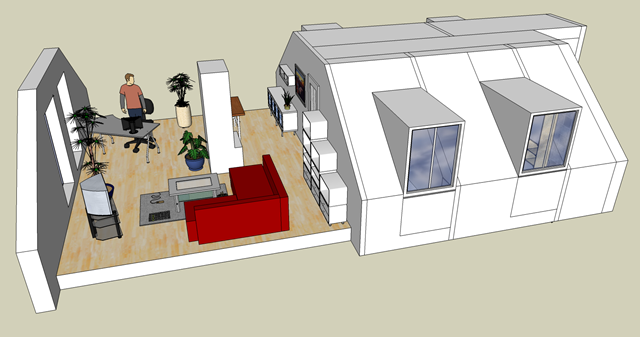
Two final notes:
- In a big copy-cat action Microsoft bought a CAD software manufacturer called Caligari, just to offer this company's C 3D design product named trueSpace for free to compete with Google SketchUp. While I found trueSpace far less intuitive and easy to use and didn’t really get into it, I still wanted to share the info here and encourage you to head over to their website, get a free copy and come to your own conclusions (which you’re free to share here of course).
- As a second note, I’ve been using Google SketchUp together with Windows 7 RC lately just to find out, that while it’s still useable it shows extremely buggy behavior regarding surface selection and rendering. This may well be related to Win 7 graphics drivers (Intel integrated graphics in my case) and not to Windows 7 itself directly, but being as buggy as it is I can’t really recommend using Google SketchUp 7 in conjunction with Windows 7 for the time being. Anyone any similar experiences? Or updates on this behavior with respect to Win 7 RTM?
Categories: Computer & Devices / Featured Articles